The New Normal – Remote Working

The current pandemic will change the way we work. Not necessarily during the next year, but certainly soon. I think that generally this will be a good thing because it has benefits for all: employees, employers, the local community, and the planet. With improvements in virtualization and cloud computing, and the government’s drive to achieve good broadband connectivity everywhere, this is certainly feasible.

What the current situation (i.e., COVID-19 lockdown) has shown is that the performance management practices that have been put in place over the last few decades make managing remote workers no different than managing office-based personnel. A person is given period targets in line with their role and if they are met or exceeded then the employee may be awarded a bonus and/or pay rise. This works regardless of whether they are in the office or at home; targets still can be met and monitored.

There are also IR35 implications for contractors, where it might be easier to show that roles are outside the IR35 regulations – but I will not discuss that today.

How employees are affected

Employees generally fall into three categories

  • working remotely full-time
  • working both in the office and remotely
  • working in the office

Fully Remote

There are reasons why employees would work remotely, mostly they would be people who have a long commute to work are likely to opt for working from home.

Pros

Cons

Less stressful as there is no commute

Need to have a study or office room to ensure company confidentiality is kept

Better work/life balance

Using more energy at home

No commuting costs

Very little interaction with other people

Can get a lot done as very few distractions


Generally, the pros and cons level out – especially when considering costs. The cost saving from commuting would probably more than cover the increased cost of electricity and heating.

Remote and Office based

An employee who wants to work in the office for some days and remotely for the others, could be someone who would like improve their work/life balance or has reasons why it is not possible to work from home all the time.

Pros

Cons

Better work/life balance

Using more energy at home

Reduced commuting costs

Need to have a study or office room to ensure company confidentiality is kept

Can get a lot done as very few distractions


Office based

Employees might not be able to work from home sometimes it is just not possible. There may be too many distractions, or they live alone, or there may not be room to ensure company confidentiality can be kept. In that case the employee would need to work in an office.

How employers are affected

Employers need to plan for the number of employees whom they would be able to support in each of the above three environments. There is a consequential impact on office space, infrastructure, and hardware.

Office Space

Office space could be smaller than the current environment, with areas setup for office-based hot-desking staff. One possibility is that business enterprise centres closer to home could be used for employees who have a long commute.

Infrastructure

The recent COVID-19 pandemic has meant that companies’ infrastructure has had to change in order to meet the challenge of remote working, so most of the necessary effort has been made to allow for both home- and business-enterprise-centre-based working. Clearly, it will take time to improve the maturity of new remote working infrastructure.

Hardware

Depending upon how the remote working infrastructure has been achieved, there is a potential cost saving in the hardware required, especially if virtual desktops have already been used as part of a solution for working remotely.

How communities are affected

There are several impacts that this new way of working will make, affecting the employees’ local community and the office’s local area.

The obvious one is the reduction in road traffic and congestion. This would result in less stress for everyone and better air quality as pollution levels fall.

What would change in the support businesses around the office? These may not be as busy as previously, with fewer people attending the office, but there will be more need for support businesses where employees reside, or at their business enterprise centres.

In conclusion

If the new way is a mixture of remote- and office-based working, it could be beneficial to everyone, almost like going back to cottage industries. It could reduce the need for people to live close together in big towns and cities, which would have a great impact when trying to achieve social distancing. Smaller towns and villages would be able to get the much-needed requirement for support businesses (like the local shop and post office). Generally, I can see this as a win/win situation.

Posted in News | Leave a comment

Automating the kitchen light using a motion sensor – version 2

Carrying on from my previous post about home automation. This is how I achieved automating my kitchen light switch.

The requirements.

  • Version 1 – When someone walks into the kitchen turn the light on.
  • Version 2 – Only turn the light on when it is dark
  • Version 3 – Turn the light off after 2 minutes after it was turned on by detecting motion.

The Process

Please click on the images to make them larger and easier to read.

Version 2

This uses IFTTT and apilio.io

As you can see from my previous blog IFTTT works fine for very simple commands, but if you want to add a little complexity i.e. only switch the light on when it is dark, then it currently is too much.

But do not despair there is another site that allow us to set states and will send triggers to IFTTT if several conditions are met.

So using both sites I have set up several applets to turn the kitchen lights on if it is dark.


(Applets can be setup in the same way as my previous blog setting up version 1)

  1. Create a new boolean variable on the apilio.io site –

Note – Remember to create all the variable names in lower case. They don’t have to be, but it is a good practice to get into.

I called mine ‘day’

2. Create two conditions

I called mine ‘day-time’ for when ‘day’ was true

and ‘night-time’ for when ‘day’ was false

3. Do the same as steps 1 & 2 for a movement variable except it only need to have one condition kitchen-movement.

4. Create a Logicblock


In IFTTT four applets are required

  1. Set day variable to true at sunrise –
    Trigger: Service – Weather Undergrand, trigger – Sunrise.
    Action: Service – Webhook, url – The url is shown in the variable information at apilio setting the ‘day’ to true
  2. Set day variable to false at sunset –
    Trigger: Service – Weather Undergrand, trigger – Sunset.
    Action: Service – Webhook, url – The url is shown in the variable information at apilio setting the ‘day’ to false
  3. Set the kitchen light trigger.
    Trigger: Service – Energenie, trigger – Motion detected for Kitchen sensor
    Action: Service – Webhook, url – The url is shown in the variable information at apilio setting the ‘movement’ to true
  4. Turn kitchen light on when it is dark.
    Trigger: Service – Webhook, trigger – event name  – the name of the event setup in the logicblock on apilio
    Action: Service – Energenie, Power on device – kitchen light.

As you see it is getting quite complicated to automatically turn the light in at night when the sensor detects movement. Because of this complexity it means there is quite a lag between the movement being detected and the light coming on.

Posted in Advice, News | Tagged , , | Leave a comment

Automating the kitchen light using a motion sensor – version 1

Carrying on from my previous post about home automation. This is how I achieved automating my kitchen light switch.

The requirements.

  • Version 1 – When someone walks into the kitchen turn the light on.
  • Version 2 – Only turn the light on when it is dark
  • Version 3 – Turn the light off after 2 minutes after it was turned on by detecting motion.

The Process

Please click on the images to make them larger and easier to read.

Version 1

Using IFTTT

  1. Create a new applet

2. Choose the trigger

3. Choose the Motion detected trigger

4. Setup the trigger options

5. Setting up the trigger has been completed.

6. Select the action

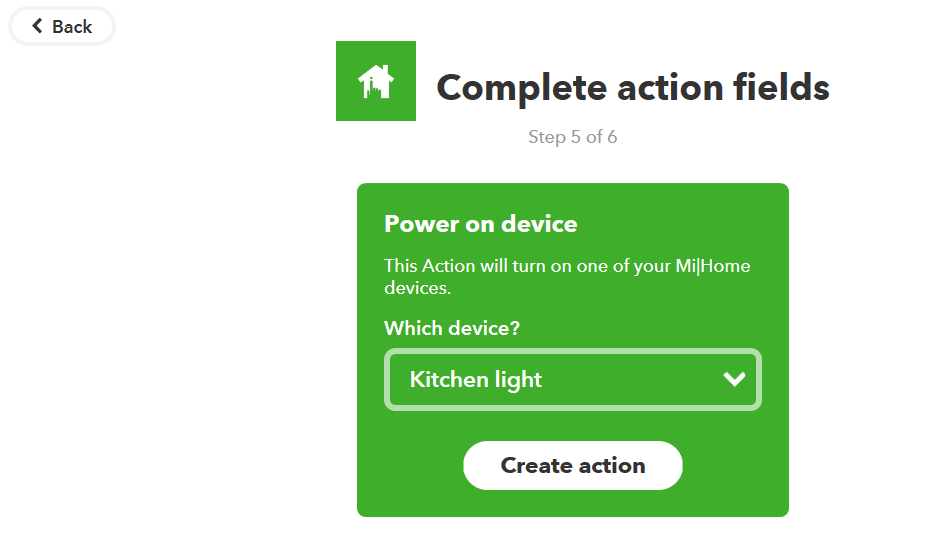
7. Select Power on device option

8. Setup the action

9. Set the description of the applet and whether to receive notifications (this is good to start with to help make sure it works)

10. Select Finish to complete the applet

This works well, but turns the light on every time someone moves in the kitchen regardless of time of day. Also because the gateway has to talk to the IFTTT service there is a delay in the light switching off.


Posted in Advice | Tagged , , | Leave a comment

Home Automation & Power consumption reduction

Its nice when you are asked by a customer to look in to the newest technology and recently I was asked to look in to Home Automation.

My customer has just recently had to completely renovate their house. My first suggestion to them was as well as updating the mains, make sure you install network cables. In my option all houses should have at least one wired network point in each room (with the exception of the bathrooms and toilets).

Also as part of the re-wire my customer was looking at putting in wireless switches to control the lights and sockets. So I was asked to research and recommend the way forward.

I also wanted to look at doing it at my house.

This meant I had a two pronged attack to the problem of ‘Home Automation’.

  1. A new/re-fit build
  2. A retro fit.

The first items I looked at were the wireless bulbs. As a mood enhancer and to change colours these seemed okay, but as infrastructure in building – no.

The next items were the in-line power sonoff power switches, but was not sure about the ease of installing them for a retro fit. There seemed to be several switches available, but they are for the American market which means they depth of the switch is around 35mm. In the UK the depth of the switch pattress boxes that are let into the wall are a lot less, 15-25mm. So looking around I found Energenie, the company is English and seemed to have the range of wireless switches that looked appeared to be almost drop-in replacements for the normal light and power switches.

After doing further research I thought I would try-out the Energenie Mi|Home range. Initially starting with their MiHome MIHO050 1 Gang Bundle Switch – White.

To install the switches I also got three single gang plate spacers as my house was built in the 1970’s and the depth of the light switches was shorter than the 25mm the switches needed. The installation was easy I have installed the gateway close to my router (which is as close to the centre point in my house) and changed three of my light switcher – a direct drop in replacement for the current ones (with a spacer).

Note: If you need the spacers you might find that you will need to get longer screws to it fix the light switch to the socket.

There is applications available from Energenie for android and apple phones available in the relevant store. Also the system can be setup via a website (mi|home portal). It quite easy – create an account (if you have not got one) and register the gateway to the account. Then register the switches to the gateway (documentation of doing this is available on their website.)

Note: One thing I found was I had to replace my led light bulbs from Tesco’s and Morrisons with Philips LED bulbs to stop the lights flashing when anybody turned a miHome switch on.

On the strength of this I ordered more light switches to replace all the light switches in the house with the exception of the hall and landing lights. I could not replace these are they both are switched by a two switches on a single plate. This option is not available yet, but according to Energenie is due out in the new year. So I will do this and let you know how it goes.

As well as the light switches I ordered the smart plugs. I ordered these rather than the double wall sockets because I group my appliances together. This way I can turn off a group at a time.

Note: Energenie recommend that smart plugs are not used close together, so I would recommend using the double wall socket if you need that.

I also got a motion sensor so I could looking into automating the kitchen light switch.

As before the installation and registration of the devices was easy, but the automation is not that easy. The functionality for turning lights on and off via your phone or a timer is there, but anything more difficult and it gets complicated.

I have received a note from Energenie on how to do it via their website.

Please use the web browser portal (https://mihome4u.co.uk) to sign into the account.  Once in there, you will be able to select the “Triggers” button on the PIR to open this option in a new page

Once on the new page, you can set the trigger for running all day or across a certain time frame.  The trigger can be set to power on or off 1 device or 1 group or set a temperature on 1 device or 1 group when motion is seen and the same for when motion stops.

Once you are happy with the setup, select “Set Triggers” and the trigger will be accepted, a message will appear at the top of the page saying “Triggers Saved”.

At present, the time frame is not set up for sunrise/sunset but we are working to add this in at the same time the triggers become available to set on the app later next year.

My experience of their support is very good.


The next post will show how I did it via IFTTT.

Posted in Advice, News | Tagged , , | Leave a comment